Scan
See confirmed updates
Chronologix checks approved sources after an explicit click and keeps installed-only inventory out of the default view.
 Chronologix
 1.0.0
Chronologix
Chronologix 1.0.0
Chronologix puts confirmed updates under their real source. Choose Update where installation is verified, Options to review evidence when no in-app executor exists, or Update All for every installable row.
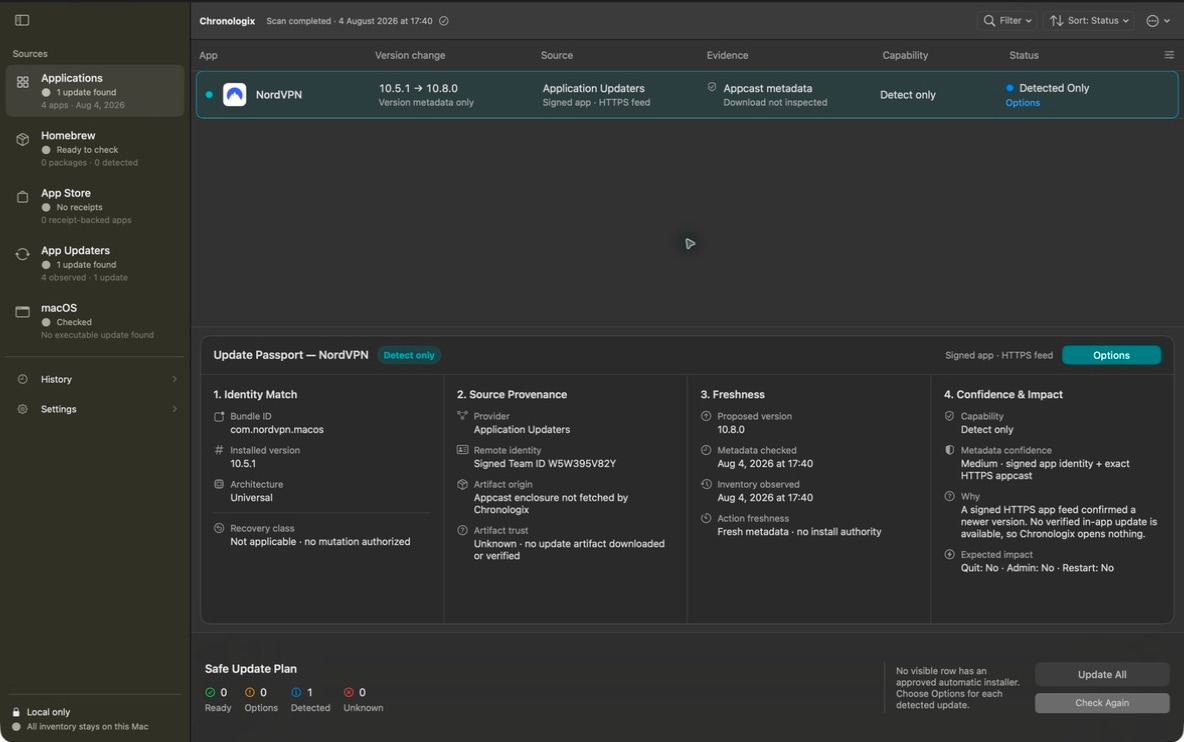
The default list contains newer versions backed by current source evidence.
Update, Options, and Update All use the same evidence-bound plan.
Starting a transaction is not success. Installation needs a checked result.
The ordinary path stays short. Evidence is close when you want it, but it never hides the update list behind diagnostics or setup screens.
Chronologix checks approved sources after an explicit click and keeps installed-only inventory out of the default view.
Use the action beside an item, or Update All for every visible update Chronologix can currently install and verify.
The Safe Update Plan shows quit, permission, restart, source, and recovery limits before anything changes.
Every confirmed newer version appears under its real source. Installable rows say Update; detection-only rows say Options and never launch another updater.
Chronologix can attribute, execute, and verify this exact update without leaving the app.
Review the evidence or check again. No app, updater, Store page, Settings surface, Terminal, or generic force path is opened.
Changed evidence, an active app, insufficient access, or recovery state stops the operation.
Missing, stale, or mismatched evidence never becomes an update or a green check.
The main action stays obvious. Update Passport and the plan explain why that action is available and where Chronologix stops.
Identity, source, freshness, signing evidence, capability, and missing information sit beside the selected update.
Review the exact entries and expected disruption before an in-app transaction starts.
Preflight, post-verification, and source-specific recovery boundaries prevent false success.
The published DMG is signed with Developer ID, notarized, stapled, and smoke-tested on macOS 14 using a standard account.
Version: 1.0.0 · Size: 5.4 MB
SHA-256: da13dc5baac465b5c4c8728a8a52ad8d79c1da9ebda6918c024f72f77ccc92dd